Printable QR code sign
Printable QR code signs for counters and tables
Every public Ask My Bot bot comes with a print-ready A4 QR code sign. Open Overview → Share assets → Print storefront sign, pick one of 9 styles, and download a high-resolution PNG with your logo, business name and a large QR code. The sign's wording follows your bot's default view, inviting people to order or to ask, and the same style is used for your table and room QR cards.
Why use the sign
Ready to print
No design work: your logo, name and QR code are laid out for you at A4 print resolution.
Styles that fit your brand
From calm Soft Waves and Gold Marble to bold Neon Night and Memphis Pop, each style keeps the QR code and text easy to read.
The right call to action
Ordering bots say Scan to order; chat bots say Scan to get started, so customers know what happens when they scan.
One link everywhere
The same QR code works on the sign, flyers, packaging, Instagram and WhatsApp, and opens your bot's default view.
Cards for every place
On Pro and higher, print a card for each table, room or seat with its own name, in the same style.
Share it digitally too
Use Share to send the sign through your phone's share menu, for example to a printer or a WhatsApp group.
Get your sign in four steps
Step 1
Open Share assets
Go to Overview, scroll to Share assets, and find Print storefront sign. Share assets are available for public bots.
Step 2
Pick a style
Under Style, choose Soft Waves, Gold Marble, Noir Bokeh, Tropical Luxe, Neon Night, Memphis Pop, Holo Glass, Boho Arches or Velvet Deco. The preview changes at once.
Step 3
Download or share
Click Download for a high-resolution A4 portrait PNG, or Share to send it through your device's share menu.
Step 4
Print and place it
Print it at A4, or give the file to a sign printer for a larger board or flex sign. Put it on the counter, wall, window, table stand or packaging.
Where businesses put it
- Counters, cash desks and reception desks.
- Shop windows, walls and entrance doors.
- Table stands, menus and room information folders.
- Packaging, flyers, event stalls and business cards.
Good to know
- Share assets, including the sign, are available for public bots; private bots don't have a public QR code.
- Your style choice is remembered for the bot on that device.
- Printed signs don't change after printing; download a new one after changing the default view or the public URL.
- Test the QR code with a phone camera before printing many copies.
Frequently asked questions
What does the printable sign show?
Your logo and business name, a large QR code that opens your bot, and a call to action. All styles except Soft Waves also add a tagline and a row of four actions under the QR code. A small Powered by AskMyBot.ai line is included.
What wording does the sign use?
It follows the bot's Default view. A bot that opens in Kiosk invites people to order (Scan to order; Ask, Browse, Order, Track). A bot that opens in Chat invites them to ask (Scan to get started; Ask, Explore, Get details, Answers 24/7). Change the default in Settings → Bot → Chat & appearance.
Which styles are available?
Nine: Soft Waves (the original layout), Gold Marble, Noir Bokeh, Tropical Luxe, Neon Night, Memphis Pop, Holo Glass, Boho Arches and Velvet Deco. They are designed for any kind of business, from cafés and salons to gyms, shops and hotels.
What size is the sign?
A4 portrait at print resolution (2480 × 3508 pixels). Print it at A4, or hand the file to a sign printer for larger boards and flex signs.
Can I get a QR card for each table or room?
Yes, on Pro and higher. Kiosk → Location QR codes prints a card per place with your business name, the code and the place's own name, such as Room 204, in the same style you chose for the sign.
Will the QR code keep working?
The sign's QR code opens your bot's public link. If the owner changes the public URL later, the old link stops working, so print a new sign. Location QR cards keep working after a URL change.
See how it works in the app
Illustrative app views with fictional businesses, contacts and sample data. Select an image to view it full size.
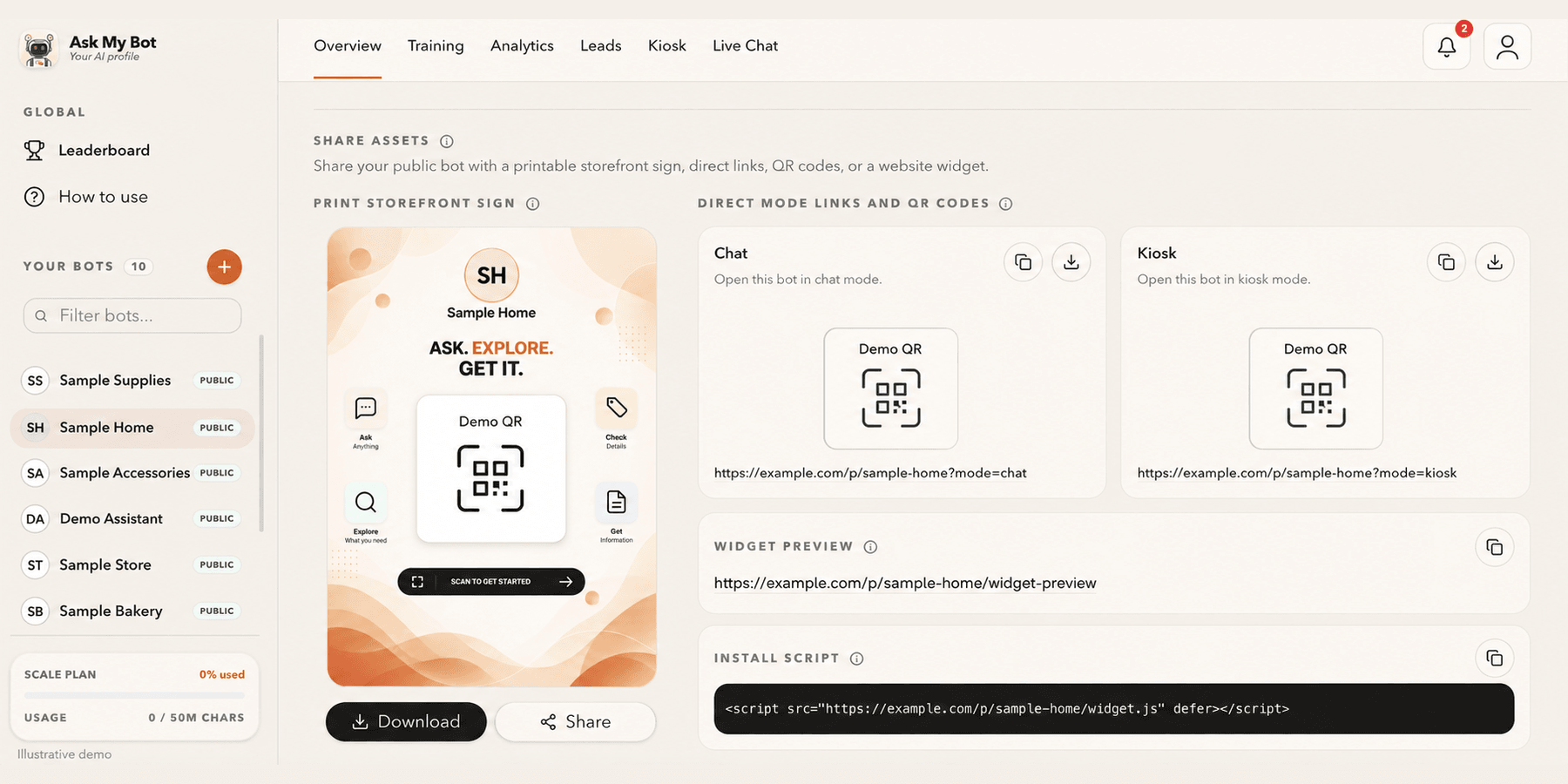
Share a link, QR code or website widget
Overview → Share assets provides one public link and QR code, a printable storefront sign and the website install script. The pictured bakery is fictional; copy working assets from your own bot.
Explore this workflowExplore the chatbot platform
Build around the knowledge and workflow you need
Customer support chatbot
Answer routine support questions and hand off when needed.
Business chatbot
Support visitors, leads, and teams with business knowledge.
Knowledge base chatbot
Turn FAQs and approved knowledge into direct answers.
PDF chatbot
Turn documents into grounded, searchable answers.
Website chatbot
Import site content and answer visitors on-page.
Private chatbot
Restrict internal knowledge to approved users.
Live API chatbot
Combine indexed knowledge with fresh endpoint data.
Lead-generation chatbot
Answer first, then capture qualified follow-up details.