Order management and Kiosk ordering
Manage products and orders from your bot
Ask My Bot Kiosk is a simple online order-management system for every active plan. Free displays up to 4 products per bot; Pro displays up to 500, Business 1,000, and Scale 2,000. Publish products, accept validated customer orders, notify authorized managers, track order status, and control fulfillment from the same public, private, or embedded bot experience.
Kiosk does not process payments: customers pay you directly, through your own payment link or UPI QR code, at the counter, or in cash. AI can extract explicit product facts, but it does not guess unclear prices, place orders, or fulfill them. Owners and authorized collaborators control catalog fields and every order-status change.
How Kiosk works
Build the catalog
Add active products, descriptions, images, categories, SKUs, prices, and one ISO currency for the kiosk.
Customers build a cart
Visitors filter product categories, adjust quantities, add a note to any item, add items you suggest with one tap, and keep their cart while moving between Kiosk screens.
Collect an order
Checkout validates current products and prices, then stores the order and returns a browser-scoped receipt.
Fulfill it manually
Authorized managers confirm, fulfill, cancel, print, or audit orders from Kiosk → Orders, and see tables and rooms in the Orders grid.
Location QR codes for tables, rooms and seats
On Pro, Business and Scale, give every table, hotel room, seat, booth or custom place its own QR code. Guests scan it, order from their phone, and staff see exactly where each order goes.
Every order shows its location
Each table, room or seat gets its own printable QR code. Orders arrive tagged with the place, such as Table 10 or Room 204, and guests can't change it.
Tables reset by themselves
Tables open when guests scan and reset after they stop ordering or once their orders are done, so the next guests start a fresh bill without staff work. Hotel rooms can be checked in and out by staff instead.
Only take orders from QR codes
Owners can accept orders only from location QR codes. Anyone opening the plain Kiosk link can still browse the menu but can't order.
Guests call staff and ask for the bill
Guests tap Call staff, with an optional note, or Ask for the bill on their running bill. Staff see a popup on any page and the request on that place in the Orders grid, then tap Done.
Built-in spam limits
Each location can have at most 3 orders waiting for confirmation, phones are rate-limited, and staff cancel waiting orders in one click. Rooms can require a 4-digit guest code that changes every stay.
Privacy-aware checkout
Owners choose which customer details and custom fields to request. Checkout includes a privacy notice, receipt tokens remain browser-scoped, and kiosk analytics exclude customer details, notes, and receipt tokens.
Read the Privacy PolicyOrder management with clear ownership
Orders start as new. Managers can confirm or cancel them, then fulfill confirmed orders. Status changes are controlled and audited; customers lose edit access once processing begins.
Read the documentationChat and Kiosk on one bot
Each mode has a distinct job. Teams can share a direct mode link or select an available default view.
Chat
Answers questions from trained and supported live content.
Kiosk
Shows products, builds a cart, and records manual orders.
Who Kiosk is for
Kiosk fits restaurants taking table or pickup orders, hotels offering in-room ordering through location QR codes, shops collecting product orders, event teams offering merchandise, and small businesses that need a lightweight catalog before adding a separate commerce platform.
Kiosk frequently asked questions
What is Ask My Bot Kiosk?
Kiosk is Ask My Bot's simple order-management workspace. It adds a product catalog, cart, configurable checkout fields, browser-saved receipts, and database-backed manual orders to an existing bot page or eligible widget.
Can I manage and track customer orders?
Yes. Authorized managers can review incoming orders, confirm or cancel them, mark confirmed orders as fulfilled, add items, print receipts and order tickets, and see each order's current status. Customers follow their order live and can find it from another phone with the order number and phone number. Payment processing is not included: customers pay you directly.
Which plans include Kiosk?
Every active plan includes Kiosk. Free saves up to 500 products per bot and displays the first 4 orderable products in catalog order. Pro saves and displays up to 500, Business up to 1,000, and Scale up to 2,000. Extra products remain saved, and owners can change the order using Arrange in Training → Products. After a downgrade nothing is deleted: the first products in catalog order, up to the new plan's limit, stay on display.
Can each table, room or seat have its own QR code?
Yes. Location QR codes give every table, room, seat, booth or custom place its own QR code on Pro (up to 25 per bot), Business (up to 100) and Scale (up to 200). Guests scan it and order, and every order shows where it came from, such as Table 10 or Room 204.
How are location QR codes different from the normal Kiosk QR code?
The normal QR code opens your Kiosk link for everyone, and its orders have no location. A location QR code belongs to one table or room: orders are tagged with that place, tables reset by themselves after guests leave, rooms can be checked in and out by staff, and owners can choose to accept orders only from location QR codes so the plain link becomes a menu to browse.
Can someone order from home with a photo of a table QR code?
Spam is capped. Each location can have at most 3 orders waiting for staff to confirm, each phone can place only a few location orders in 10 minutes, and nothing is prepared until staff confirm. Staff can cancel a location's waiting orders in one click or replace a misused code. Hotel rooms can also require a 4-digit guest code that changes every stay.
Can customers add notes or see suggested items?
Yes, on every plan with Kiosk. At checkout, customers can add a short note to any item, such as No onion, Gift wrap or Size 8 please; staff see it on the order, ticket and receipt. Owners can pick up to 3 items that go well with a product, such as fries with a burger or gift wrap with perfume, and customers add them with one tap from the item view or their cart.
Can customers use the Kiosk in their own language?
Yes, on every plan with Kiosk, with nothing to set up. The Kiosk's buttons, checkout, order status, bill and messages are available in English, Hindi, Bengali, Marathi, Telugu, Tamil, Gujarati, Kannada, Malayalam, Punjabi and Arabic. It opens in the phone's language when it is one of these, and customers can switch from the menu at the top. Item names and descriptions stay as you wrote them; customers can use their browser's Translate for those.
Can the kitchen see orders on a screen?
Yes. Prep screen in Kiosk → Orders opens a live, full-screen list of open orders for a tablet in the kitchen, bar, salon or packing desk. Prep areas send each category's items to its own area, with its own ticket, printer and screen.
Does Kiosk process payments?
No. Payment processing is not included, and Ask My Bot never holds your money. You can add your own payment link or UPI/payment QR code; customers pay you in their own app, tap I've paid, and your staff verify the payment in Kiosk → Orders. Cash, card or counter payments can be recorded with Mark as paid.
Can Kiosk send new orders to another system?
Yes. Business and Scale owners can configure an authenticated HTTPS order webhook in Settings → Integrations → Webhooks by ticking New orders. New orders are delivered asynchronously with retries, without delaying customer checkout.
Can Kiosk handle delivery, pickup and dine-in?
Yes. Add up to 10 fulfillment options, such as Delivery, Pickup, On-site / dine-in, Digital delivery or Service request, each with its own customer fields and payment choices (pay online, pay at counter, or cash on delivery). Delivery fees, a minimum order and free-delivery thresholds are supported. At delivery checkout, customers can tap Use my current location or paste a Google Maps link: the address fills in, and a distance-based delivery area is checked before they order.
Can I add GST or other taxes?
Yes. Add up to 4 taxes such as CGST 2.5% and SGST 2.5%, choose whether prices include or exclude tax, and print your GSTIN or tax ID on receipts. Tax is charged on items, never on the delivery fee.
Can I print receipts and kitchen order tickets?
Yes. Print an 80 mm receipt or an order ticket (KOT) for the kitchen, bar or room service on any installed printer. With the free QZ Tray app, Print receipt sends the bill and the ticket to their printers in one click. Reports show day-end sales, taxes and how orders were paid, with CSV export.
Does AI create products, set prices, or process orders?
AI can extract explicit catalog rows from Training sources or a manager-requested import. It does not guess unclear prices or process orders. Authorized owners and collaborators control catalog fields and order statuses, and the server validates current products and prices at checkout.
Can Kiosk work on public pages, private bots, and widgets?
Yes. Public bot pages, authorized private bot pages, and eligible domain-approved widgets can show Kiosk when the bot owner's plan and kiosk settings allow it.
What customer information does Kiosk collect?
The owner chooses whether to request standard details such as name, phone, or email and can add checkout fields. Checkout explains that submitted details are shared with the owner and authorized collaborators for fulfillment.
How are orders fulfilled?
Owners and authorized collaborators review orders, confirm or cancel them, and mark confirmed orders fulfilled. Customers can edit only while an order remains new.
How do Chat and Kiosk work together?
They are two views on the same bot surface. Chat answers questions and collects lead details conversationally on eligible plans. Kiosk presents products and accepts orders for manual fulfillment.
See how it works in the app
Illustrative app views with fictional businesses, contacts and sample data. Select an image to view it full size.
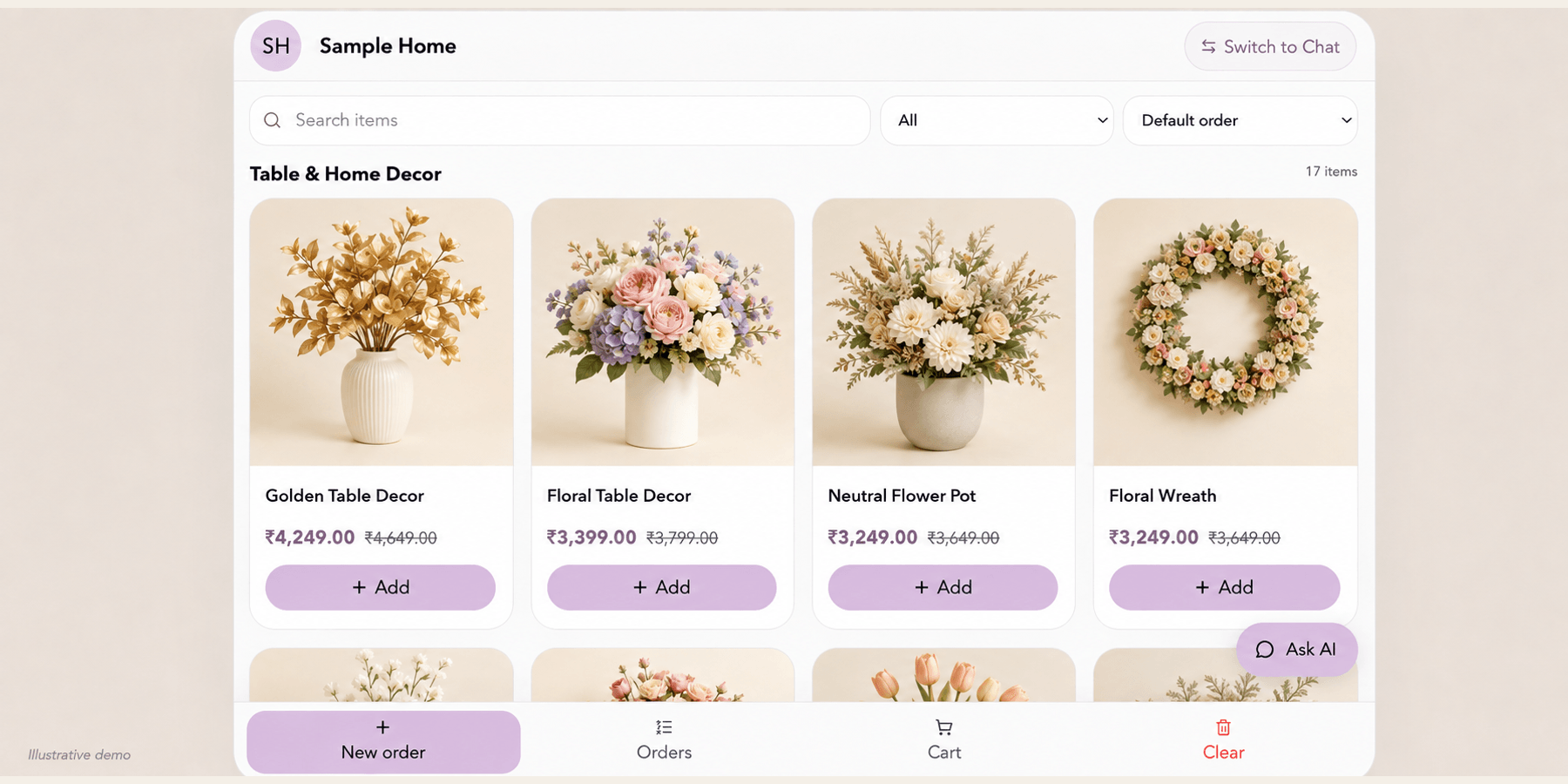
Let customers browse your Kiosk
Customers search and browse available products, review prices and add items to a cart. Free Kiosk displays up to 4 products per bot; Pro displays up to 500, Business 1,000, and Scale 2,000. Kiosk records orders for manual fulfillment; payment processing is not included.
Explore this workflow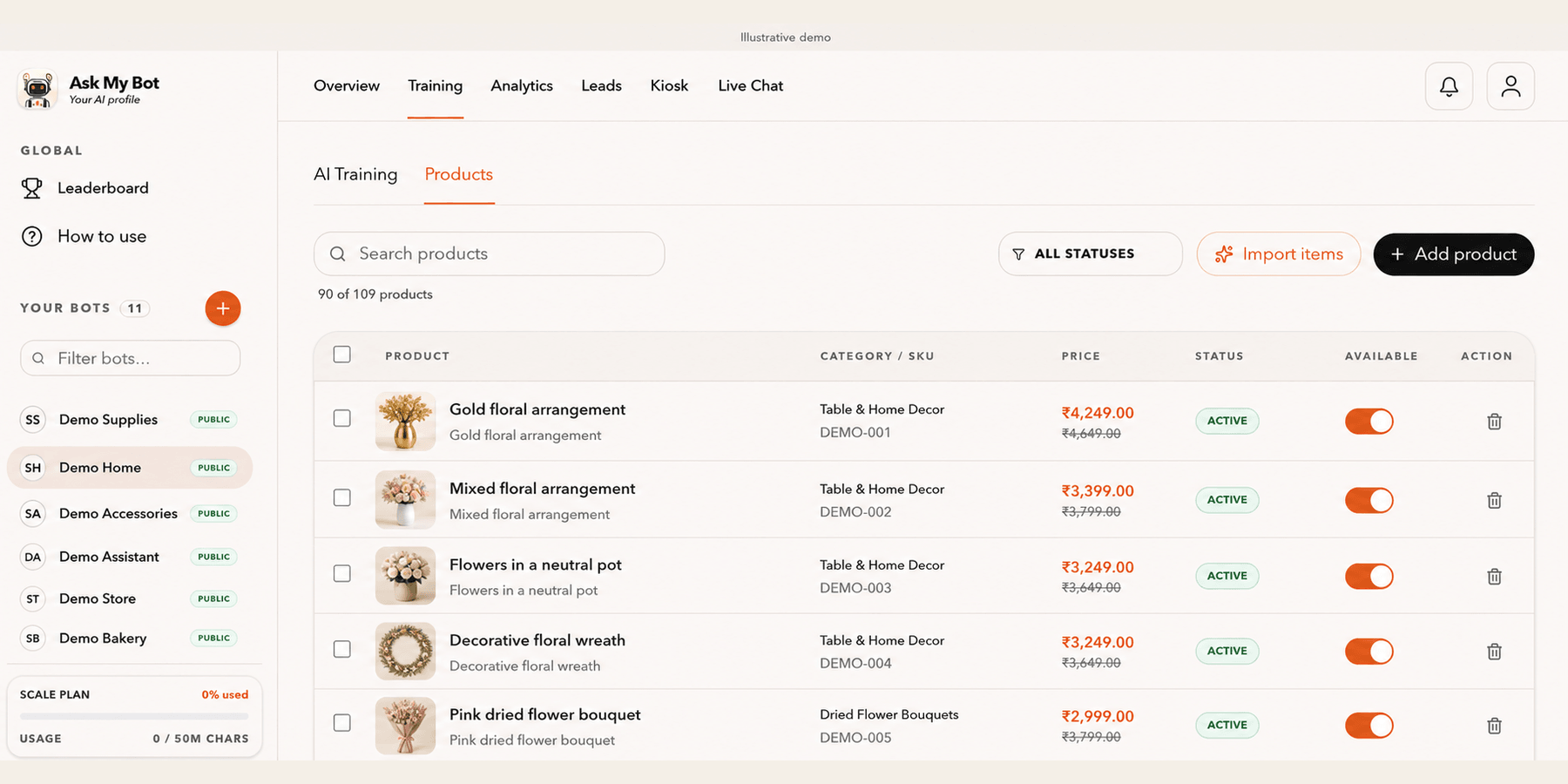
Manage products in Training
Training → Products organizes catalog items by name, description, category, SKU, price and availability. Review imported items before making them available to visitors.
Explore this workflow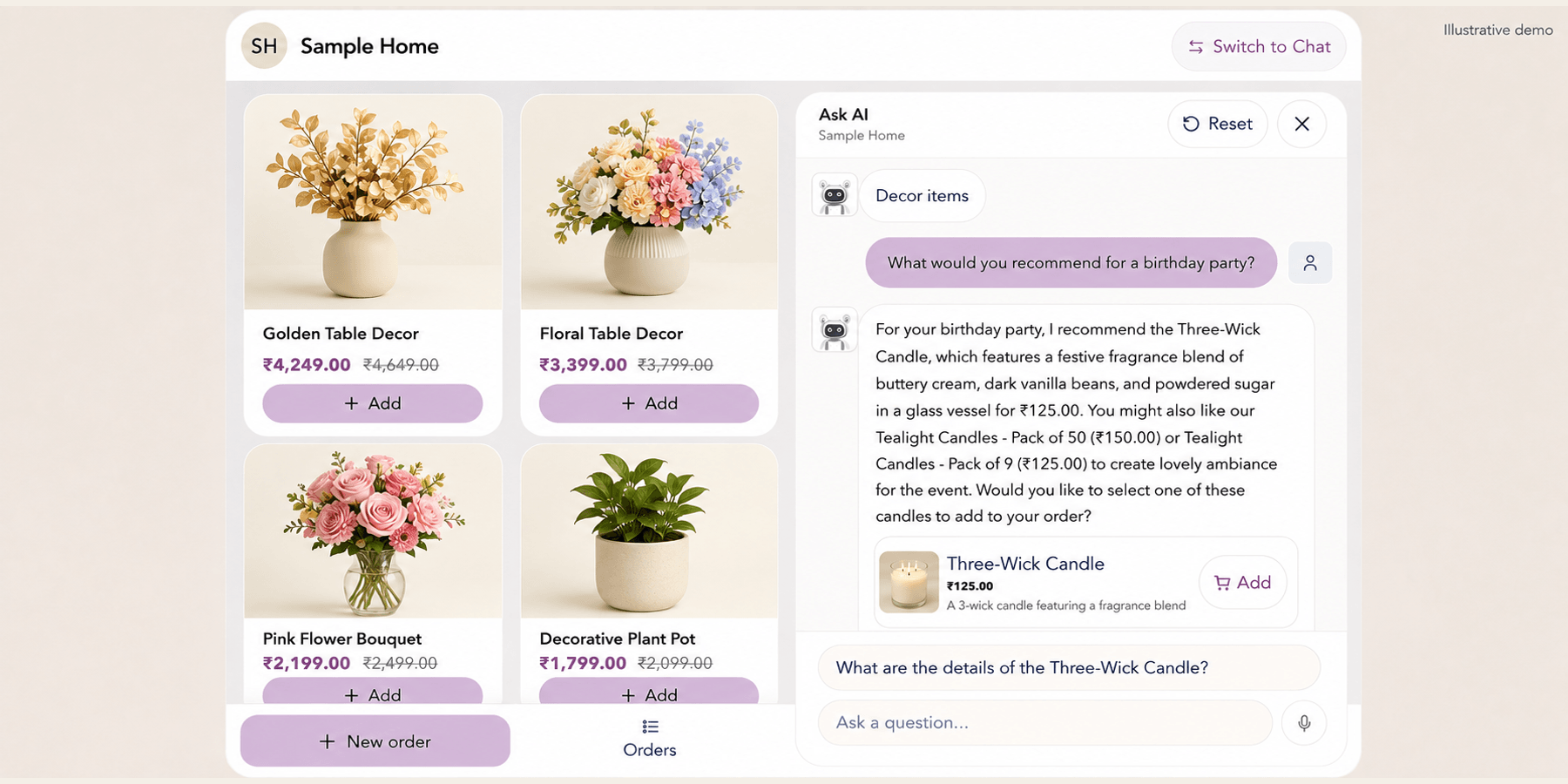
Answer questions while customers browse
Ask AI opens beside the catalog so visitors can ask about products while browsing. Recommendations use available bot knowledge and catalog information.
Explore this workflow